Inside the product

A website workspace.
From the first question to the client report.

Awesome.Digital is a workspace for website audits, page and keyword research, content production, publishing, and client reporting. Each website has a record that keeps its findings, work, and results together. Start with a URL; connect more evidence and use the tools included in your plan as the work grows.

Looking for a specific tool? Search the feature catalog or browse connections and integrations, including Search Console, GA4, BigQuery, GitHub, and your own agents.

Check My Site Free →

No signup to start the check. Ongoing access, production work, and connected sources depend on your plan and setup.
Three ways you might use it.

Business owner

I want to understand my own website.

  1. 1.Enter your URL in the free check and save the report by email.
  2. 2.Review the findings, then claim an eligible free account from the verified report.
  3. 3.Reply to the report to discuss ongoing access or help with the work. Paid plans are assigned and invoiced during the assisted launch.
Start with the audit →

Agency or operator

I need to choose my client’s next piece of work.

  1. 1.Open the assigned website record and review the audit and connected evidence.
  2. 2.Check existing pages before commissioning content. Agree on a target URL, brief, and completion check.
  3. 3.Review the draft or fix, use an approved publishing path, and verify the live change.
Explore the research workflow →

Reporting

I need to show a client what happened.

  1. 1.Select the record and a reporting period with comparable evidence.
  2. 2.Review results separately from readiness, and include the work actually shipped.
  3. 3.Approve the report revision before delivery and use the next decision to guide further work.
Explore the reporting workflow →

01 / Website workspace

Keep the business, its website, and its evidence together.

Choose a website record before you start work. A record is the shared context for that business: its profile, connected sources, audit history, content, and reports.

See the agency workflow →

What you bring

A website URL and business context, such as services, audience, locations, and the questions customers ask. Connect only sources you are authorized to use.

What you do

  1. 1.Open the website from Records and check its business profile in Settings.
  2. 2.Connect available sources such as Google Search Console and Google Analytics to add search and traffic evidence.
  3. 3.Use Overview to orient yourself, then open the relevant work or measurement view.

What you leave with

One place to return to for this website, with its audit history and available evidence. An agency can switch between assigned client records without treating every client as the same business.

Find it: Records → choose a website → Overview / Settings

Access and scope: Signed-in users work within their owned or assigned records. Sources require the appropriate account access; viewing a record does not grant permission to change it.

02 / Audits and action plans

Find the issue and the page it affects.

Run a check, inspect the findings, and use the action plan to choose work. The audit looks at technical access, content structure, query coverage, and authority. AI observations remain a separate form of evidence.

Follow a real finding into an action →

What you bring

Your website URL for the free check. In an account, the selected website record and the scope of the audit you are allowed to run.

What you do

  1. 1.Start the free check without signup, or run an available audit on your record.
  2. 2.Read the finding alongside its affected page and supporting evidence. Check the date and scope before acting.
  3. 3.Open Action Plan, validate the recommended change, and agree who will do it.

What you leave with

A report and a prioritized starting point for work: what needs attention, why it matters, and which change to investigate first. The check does not silently rewrite the site.

Find it: Free check, then record → Overview / Action Plan / History

Access and scope: The free check covers a technical preview and sampled AI answers when available under its cap. Account audits and deeper research depend on the plan and available sources.

03 / Page and keyword research

Decide what to update before writing something new.

Content intelligence connects the site inventory to topics, queries, and opportunities. It helps an operator investigate weak pages, missing answers, and overlapping coverage rather than treating every keyword as a new article.

Turn page research into an action plan →

What you bring

The existing pages and sitemap, plus available search queries, page performance, and keyword research. A specific service or buyer question gives the review a useful focus.

What you do

  1. 1.Sync the sitemap and inspect the pages that already cover the topic.
  2. 2.Review recommendations to create, differentiate, refresh, consolidate, prune, clean up, or interlink pages. Validate each against the page and its evidence.
  3. 3.Choose the target page for an optimization brief or answer blocks, such as a direct opening answer, FAQ, or definition. Keep the reason with the decision.

What you leave with

A page-level content decision supported by evidence. Refresh and consolidation candidates still need review; the tool does not make a redirect safe just by suggesting it.

Find it: Operator workspace → Content → Intelligence / Topics

Access and scope: The full Content Engine is an operator workspace. Research and production support are scoped with your package; this is not a promise that every client sees every operator tab.

04 / Content and campaigns

Turn source material into work your team can review.

Prepare a content brief, generate or revise written content, and review it against the business and its sources. Campaigns can organize written and media outputs around a shared brief instead of starting every asset from scratch.

See how approved work reaches a website →

What you bring

The selected topic or page, business context, source material, and brand guidance. For a campaign, add the brief, source content, and the outputs you need.

What you do

  1. 1.In Content Creator, start through an agent conversation or manual setup with an approved article, intent, audience, and target page.
  2. 2.Prepare a draft or revision through the supported production workflow, then review the claims and quality checks. Content certification is a review stage, not a guarantee of accuracy.
  3. 3.Available output choices include an article, LinkedIn or Facebook post, carousel, YouTube video, and vertical short. Select the formats you want to request. Review any assets available in the campaign before release.

What you leave with

A campaign brief and requested formats, plus drafts or revisions from supported production work. The wider operator workflow can also prepare answer blocks, content briefs, schema, and machine-readable files for review.

Find it: Record → Campaigns → Content Creator where enabled; operator workspace → Content → Articles / Briefs

Access and scope: Output choices are not a promise that every format is rendered or published end to end for every account. Generation, Campaigns, rendering, and production volume depend on enabled features and package scope. Founding beta access is not a blanket inclusion of content production or earned placements.

05 / Publishing and handoffs

Review the destination as carefully as the draft.

For a connected GitHub site, publishing can use a branch and pull request so the change can be reviewed before it reaches the live website. Other destinations follow their own supported handoff.

Plan the change and its verification →

What you bring

Reviewed content, an authorized destination, and the intended file or page. Check the proposed change before approving publication.

What you do

  1. 1.Prepare the content and confirm which site and destination it belongs to.
  2. 2.Use the supported GitHub publishing flow and review the branch or pull request.
  3. 3.After the destination deploys, inspect the public URL and record what actually shipped. A prepared draft or successful handoff is not proof of a live page.

What you leave with

A reviewable site change or an explicit publishing handoff, followed by a public URL to verify. Keep the release date for the later results comparison.

Find it: Connected GitHub publishing; operator-assisted destination setup

Access and scope: GitHub publishing is live for authorized records and included features. WordPress publishing is coming soon. Publer distribution is an operator workflow, not a client self-serve publishing screen. Other CMS work may need a manual handoff.

06 / Bring your own agent

Use your agent with your website records.

The in-app record agent and personal agent access give you different ways to work with the same business context. Personal tokens let supported API, CLI, or MCP workflows act within your existing permissions.

Compare agent access paths →

What you bring

An account with access to the website record, an appropriate personal token, and a supported agent client or command-line workflow.

What you do

  1. 1.Open Account, then Agent access, and choose the appropriate access level and token use.
  2. 2.Connect a supported client using the setup guide, then inspect the enabled tools before asking it to work on a record.
  3. 3.Review the proposed work and receipts. Complete any required human approval yourself, and revoke the token when it is no longer needed.

What you leave with

Agent-assisted work tied to a website record, with revocable access and the same role and plan boundaries.

Find it: Account > Agent access; record agent where enabled

Access and scope: Personal agent tokens are live. Hosted MCP has a narrower tool set than the operator CLI. Its protocol is live, but client verification, Claude app sign-in, and directory approval remain unverified. Hosted GSC, GA4, and content-opportunity reads are not yet enabled.

07 / Connected data and history

Build a history you can return to.

Connect Search Console and GA4 to the website record. Collected audits, queries, pages, and observations let later work use evidence from more than the latest snapshot. Platform exports also support analysis in BigQuery.

Explore data, warehouse, and trend features →

What you bring

Authorized Google properties, available source history, the pages or queries you want to follow, and the date of a change.

What you do

  1. 1.Connect the intended Search Console and Analytics properties and check the source dates.
  2. 2.Use available query and page evidence to investigate topics, trends, and the pages that deserve attention.
  3. 3.Compare equivalent periods after a release. Ask an operator for deeper page-day analysis or warehouse work when required.

What you leave with

Dated evidence and comparable reporting windows, or a clear explanation of what cannot yet be measured.

Find it: Record connections, Results and Reports; detailed source and warehouse tools with an operator

Access and scope: Coverage depends on successful collection, permissions, and source windows. Previously lost data cannot be recreated. BigQuery is a platform capability, not a promise of a one-click customer warehouse connector or unlimited retention.

08 / Search and AI results

See what was observed, where it came from, and when.

Use Results and citation views to examine visibility alongside the website work. Connected search and analytics sources add query, page, and traffic evidence. A readiness score, a model check, and an imported citation observation answer different questions.

Understand readiness, citations, and results →

What you bring

Authorized data connections and available audit or citation observations. Choose a comparable date range, query or prompt set, and page scope for a before-and-after review.

What you do

  1. 1.Inspect available search, traffic, and AI evidence for the selected record.
  2. 2.Read the source, observation date, and limits of the measurement. Check whether a missing value means no data or a measured zero.
  3. 3.Compare the same scope after the change and decide whether to continue, revise, or investigate further.

What you leave with

Evidence for the next decision, including inconclusive results. Citation research can show which sources appear in observed answers; it cannot guarantee the next answer will mention the business.

Find it: Record → Results / Visibility → Citations; connected source views for operators

Access and scope: Citation checks and connected measurement depend on plan, permission, and source availability. Collection may have usage limits or require confirmation. Connecting a source does not create missing historical observations.

09 / Client reports

Explain the work and the next decision to a client.

Reports bring available evidence into a reviewable account of readiness, search, traffic, AI visibility, work shipped, and the next decision. Connected local sources can add local context.

See reporting for an agency portfolio →

What you bring

The website record, reporting period, included template, connected evidence, and any supporting uploads or manual context.

What you do

  1. 1.Create or assemble a report using the available sources and an included template.
  2. 2.Review the draft, source dates, limitations, and work summary. Resolve unsupported claims before approving the revision.
  3. 3.Deliver the approved revision through the supported report workflow. Return to it when deciding the next month’s work.

What you leave with

A report available in the app, as a PDF, or through approved email delivery. The free scan report and an ongoing client report are different deliverables.

Find it: Record → Reports

Access and scope: Report templates and actions depend on plan and record permissions. Agency branding adds your name and logo to the header, PDF, and delivery email; it does not include custom themes or a custom sender domain.

An actual output

Open a report before you run a check.

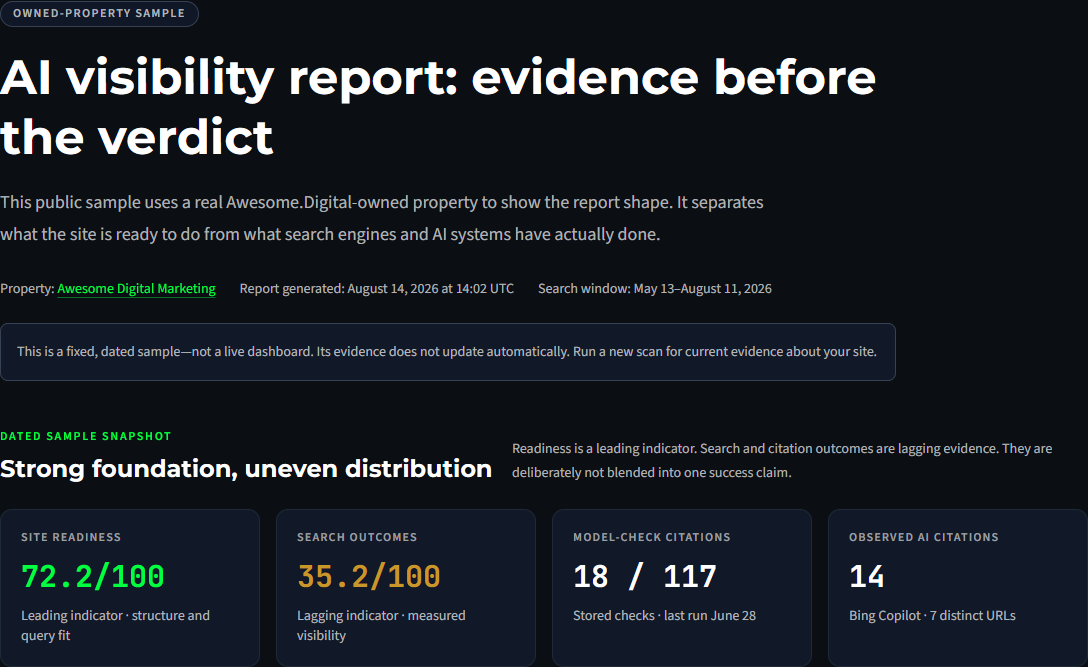
This public report shows the difference between readiness, search outcomes, and AI observations. Read its evidence notes and next action to see how a report supports a decision.

Actual public sample report for Awesome Digital Marketing, generated August 14, 2026. Separate cards show site readiness, search outcomes, model-check citations, and observed AI citations.
Unaltered excerpt captured November 14, 2026 from the public sample. The report is a fixed August 14, 2026 snapshot of an owned property, not a live dashboard or a client success claim. Read the full sample and its limitations →

What can I do myself?

On an owned or assigned record, included features let you connect a source, run an audit, read the plan, inspect citations and results, work with reports, and use supported GitHub publishing. Your role and plan determine the available actions. The full Content Engine and some connected-source tools remain operator workspaces.

Compare plans and assisted services →

What happens with an operator?

An operator can help interpret page research, prepare production work, connect a publishing destination, or manage delivery. A Loop Sprint scopes one diagnosis, fix, and re-measurement; Managed Loop provides ongoing scoped work. Paid access is currently assigned and invoiced, with no self-serve checkout.

Use the report reply path to agree on scope. Content approval, destination access, and actual publication remain distinct steps.

Start with one website and one useful question.

Run the free check to get your first evidence. Then decide whether you need a page fix, content work, connected measurement, or help running the process.

Check My Site Free →